
Processing…
Web Development · AI Agents
Since October 7, 2026, protect Copilot agent execution: step-by-step configuration, denial tests, and resuming Codex sessions.
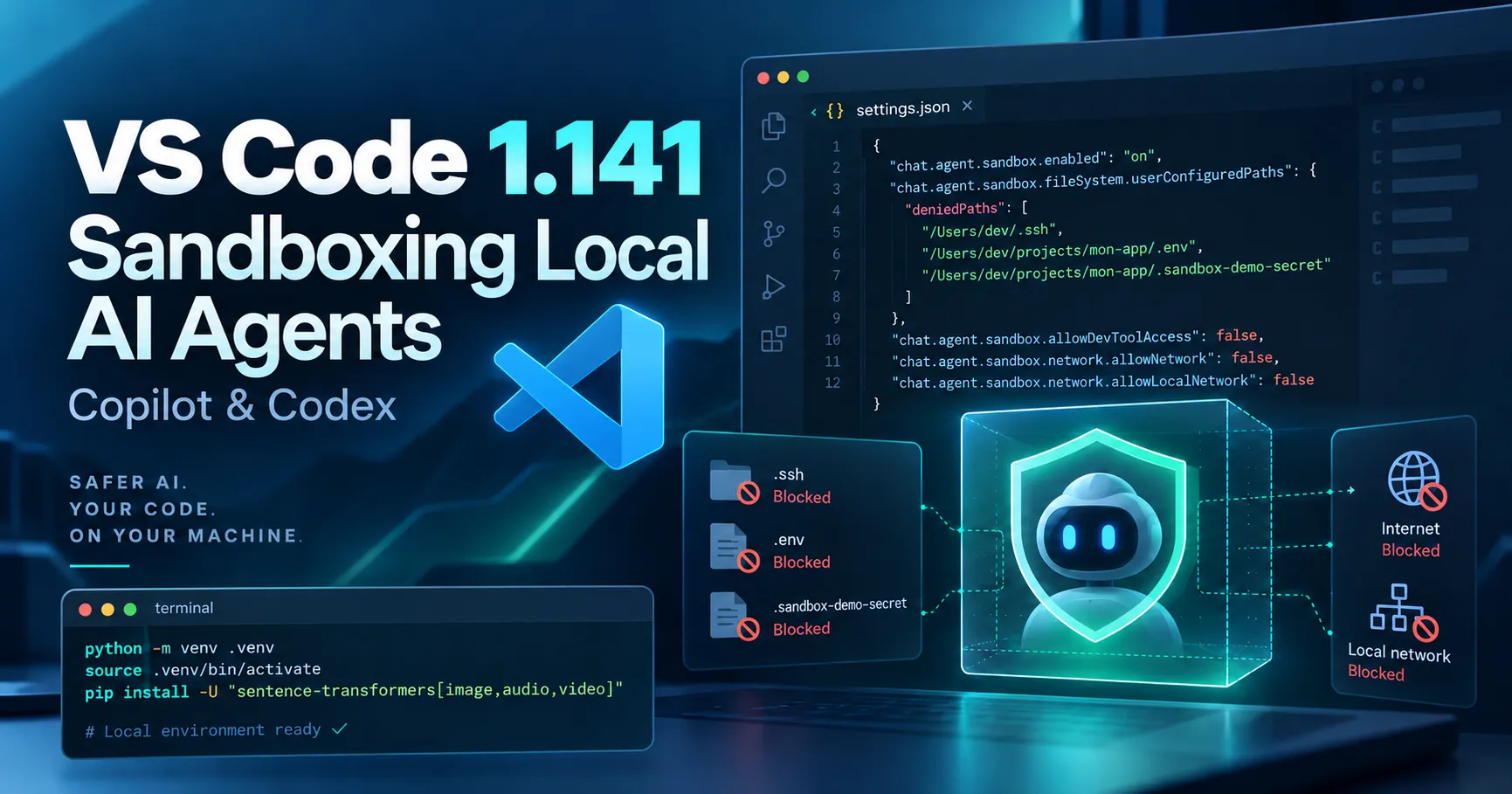
Available as a stable release since October 7, 2026, VS Code 1.141 introduces a practical improvement to working with development agents: Copilot Agent Host tools can now run in a sandbox on Windows, macOS, and Linux. It controls which files and network resources are accessible when an agent runs commands, rather than relying solely on a confirmation prompt.
On the same day, GitHub announced the general availability of local Copilot sandboxing in Copilot CLI, the Copilot app, and VS Code sessions using Agent Host, at no additional cost in Copilot. Note, however, that requirements vary by platform, and Windows support is still described as experimental in the VS Code documentation. This guide provides a testable configuration, from the current repository to sensitive files, then shows how to resume multiple Copilot and Codex conversations.
The sandbox imposes actual restrictions on operations supported by Agent Host, including commands and their child processes. It is disabled by default; most importantly, enabling it does not automatically disable internet access. Directories, credentials, network access, and the ability to run commands outside the sandbox are configured separately.
An agent can install dependencies, explore a repository, modify files, or run a script. Without an explicit policy, these actions may access more resources than necessary. In VS Code 1.141, the Copilot Agent Host sandbox combines operating-system restrictions with controls specific to the agent host. You can distinguish paths that are read/write accessible, read-only, and denied, while managing network access, Git access, GitHub CLI credentials, and, when managed by Agent Host, MCP servers and language servers.
Approvals and sandboxing are not equivalent: approval determines whether an action can start; the sandbox determines which resources it can use. In a remote session, these limitations apply on the host running the tools, and configured paths refer to that host, not necessarily your local computer.
bubblewrap and socat on the execution host. On Debian or Ubuntu: sudo apt-get install bubblewrap socat. WSL1 is not supported.This tutorial covers sandboxing operations run by Copilot Agent Host. Importing a Codex conversation into the interface does not mean its execution is automatically governed by the same policy.
"chat.agent.sandbox.enabled": "on"; the accepted values are on and off, not booleans./sandbox policy in the Agent Host chat. The report opened by VS Code specifies whether the sandbox is active, which system enforces it, and which file and network permissions are effective.The current working directory automatically has read and write permissions. So open only the relevant repository rather than granting access to the entire user directory. The policy report helps identify implicit allowances and any organizational rules.
Here is a deliberately restrictive example to place in the execution host's settings.json. It assumes that the /Users/dev/projets/mon-app folder is open as the working directory. Replace all absolute paths with your own: the examples below use macOS format and must be adapted for Linux or Windows.
{
  "chat.agent.sandbox.enabled": "on",
  "chat.agent.sandbox.fileSystem.userConfiguredPaths": {
    "deniedPaths": [
      "/Users/dev/.ssh",
      "/Users/dev/projets/mon-app/.env",
      "/Users/dev/projets/mon-app/.sandbox-demo-secret"
    ]
  },
  "chat.agent.sandbox.fileSystem.allowDevToolAccess": false,
  "chat.agent.sandbox.network.allowNetwork": false,
  "chat.agent.sandbox.network.allowLocalNetwork": false,
  "chat.agent.sandbox.credentials.authenticategit": false,
  "chat.agent.sandbox.credentials.authenticategh": false,
  "chat.agent.sandbox.allowUnsandboxedCommands": false
}
With this configuration, the current repository remains accessible for code changes, but .ssh, .env, and a dummy test file are explicitly denied. The allowDevToolAccess: false setting removes implicit permissions for certain development tools, caches, and configurations; as a result, it may prevent installations or builds. Add only strictly necessary paths afterward, after checking /sandbox policy.
Outbound and local network access are disabled; mechanisms for accessing Git and gh credentials are also turned off. Finally, allowUnsandboxedCommands: false prevents the agent from proposing to run a command outside the sandbox when it is denied. With the default value of true, such a bypass can be requested with confirmation: understand the consequences before allowing it.
Files such as .env, keys, or tokens stored in the project are not protected simply because Git ignores them. Path restrictions must cover them explicitly. On Windows, do not assume a rule is effective without testing it: some capabilities remain experimental.
To check the result without risking exposure of a real key, manually create a dummy .sandbox-demo-secret file in the repository containing only fictitious text, and make sure its path is listed in deniedPaths. Then, from the agent chat — not the regular VS Code terminal — request the following actions:
.sandbox-test-ok.txt at the repository root. The operation should succeed because the working directory has write access..sandbox-demo-secret. Access should be denied without displaying the dummy contents.curl -I https://example.com. With allowNetwork: false, the outbound request should fail./sandbox policy again and compare the reported rules with the observed behavior. If a denied access succeeds, stop the test and check the host, the engine in use, and its settings.The exact error text varies by platform. The goal is an actual denial, not a particular message. When testing is complete, delete the test files. Avoid using real sensitive data as bait.
A build may need the npm registry or a GitHub API. If network access must be re-enabled, it is better to specify explicit destinations than to reopen all connections. Here is an example replacing the previous network keys:
{
  "chat.agent.sandbox.network.allowNetwork": true,
  "chat.agent.sandbox.network.allowedDomains": [
    "registry.npmjs.org",
    "api.github.com"
  ]
}
These domains are examples: check which ones the project actually needs. Local network access is a separate permission. Note: on Windows, a proxy, hostname filtering, or credential masking may require enabling local network access, which broadens the access surface. Check your platform's limitations before adopting this setup.
For servers launched or managed by Agent Host, the chat.agent.sandbox.mcpServers and chat.agent.sandbox.lspServers settings help maintain confinement where available. An MCP server launched independently of Agent Host is not automatically covered by this scope.
VS Code 1.141 also improves tracking multiple agents. The Agents window detects external conversations created in Copilot CLI and the Copilot app as soon as they become active, then lets you open and continue them. It can also resume conversations started in Codex CLI or the local ChatGPT/Codex app, including their history, when Codex is enabled.
Policies are not universal: Copilot CLI has its own /sandbox command, the Copilot app has per-project settings, and VS Code Agent Host uses its host settings. Changing permissions in one application does not automatically configure the others. Resuming a Codex chat in VS Code also does not guarantee that its commands follow the Copilot engine's sandbox.
Microsoft notes that sandboxing adds a layer of protection but is not, on its own, a complete security boundary. Processes still run on the host under the user's account. Some restrictions rely on controls built into the agent rather than purely system-level isolation. This does not replace updates, strict credential management, or review of commands and changes.
The GA announced by GitHub on October 7, 2026 is an important milestone, but it does not remove system requirements, experimental limitations on Windows, or the specifics of enterprise policies. To run highly untrusted dependencies, a VM or Dev Container may still be necessary alongside the local sandbox.
/sandbox policy.Announcements and documentation consulted for settings and limitations:
WEB DEVELOPMENT
PHP migration, CMS update or framework evolution: identify compatibility points and validate essential user journeys before going live.
Enter at least 2 characters to start searching.
